
Learning how to Automate GST Reminders via WhatsApp is the single most effective way for a CA firm to save 20+ hours every month.. For the modern Indian Chartered Accountant, the “GST week” is often synonymous with chaos. Despite having robust team structures, most firms lose 15–20 hours per month simply chasing clients for purchase registers, bank statements, and sales data. Many firms fail because they don’t know how to Automate GST Return Reminders via WhatsApp properly.
In 2026, manual follow-ups via phone calls or emails are no longer efficient. Your clients are on WhatsApp, and that is where your automation should live. This guide will show you how to build a 100% automated GST reminder system that reduces follow-up time by 40% or more.
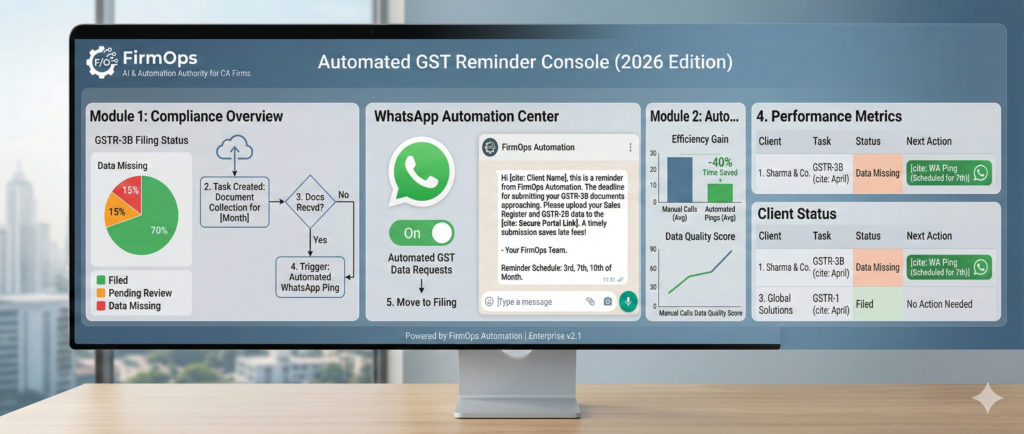
Table of Contents
1. Why You Should Effortlessly Automate GST Reminders via WhatsApp
Staying compliant with the latest regulations on the Official GST Portal is the top priority for every firm. By leveraging WhatsApp Business API, CAs can ensure their clients never miss a filing deadline again. In India, email open rates for MSMEs (Micro, Small, and Medium Enterprises) are notoriously low—often under 15%. Conversely, WhatsApp messages have an open rate of over 90% and are usually seen within minutes.
By automating these reminders, you:
- Eliminate Human Error: No more forgetting to ping that one “difficult” client.
- Improve Data Quality: Clients are more likely to send a quick photo or file via WhatsApp than log into an email portal.
- Free Up Staff: Your article assistants can focus on actual filing and auditing instead of playing “phone tag”.
2. Top Tools for GST WhatsApp Automation
To hit your goal of a scalable, ₹2L/month practice, you need tools that offer native integration. Here are the top 2026 recommendations:
| Tool | Type | Best For | WhatsApp Feature |
| Jamku | Practice Management | Indian CA Firms | Native GST/IT Portal Reminders |
| WebLedger | Practice Management | Workflow & Audit | Automated Document Collection |
| Zoho Practice | Ecosystem | Large Scale Firms | Integrated Zoho Cliq/WhatsApp |
| Interakt/Wati | API Tool | Custom Automation | High-volume Broadcasting |
3. Method 1: Using Practice Management Software (The Easy Way)
The most efficient way to automate is through software built specifically for the Indian compliance cycle.
Using Jamku for Automated Pings
Jamku is the leader in this space because it understands the “GST Calendar.” You can set up “Task-Based Reminders.” When a GST task is created for a client, Jamku can automatically send a WhatsApp message if the “Documents Received” status is not checked by a certain date. Software like Jamku makes it simple to Automate GST Reminders via WhatsApp with one click.
Using WebLedger Office
WebLedger offers a “Document Request” module. You can select a batch of clients and hit “Request via WhatsApp.” The system sends a secure link where the client can upload their files, which then syncs directly to your audit folder.
4. Method 2: Using API-Based Tools for Custom Workflows
If you want a more “High-Ticket” custom feel, you can use tools like Zapier or Pabbly Connect to link your CRM with a WhatsApp API provider. Using APIs allows you to Automate GST Reminders via WhatsApp at a much larger scale.
- Trigger: A date (e.g., 5th of every month) or a change in your Excel/Google Sheet.
- Action: Send a template message: “Hi [Client Name], this is a reminder from FirmOps. Please share your GST data for [Month] by tomorrow to avoid late fees.”.
5. Best Practices for WhatsApp Reminders
- Be Specific: Don’t just say “Send data.” Say “Please send your Sales Register and GSTR-2B data.”.
- Timing Matters: Send the first reminder on the 3rd, the second on the 7th, and the “Final Warning” on the 10th.
- Use Links: Always include a link to your client portal or a secure Google Drive folder to minimize friction.
6. Step-by-Step Implementation Checklist
- [ ] Select Your Tool: Choose between Jamku, WebLedger, or Zoho.
- [ ] Verify Contact Data: Ensure all client mobile numbers are updated in your CRM.
- [ ] Draft Templates: Create 3 levels of reminders (Gentle, Urgent, Final).
- [ ] Test Run: Send a test reminder to your own number first.
- [ ] Go Live: Activate the automation for the upcoming GST cycle.
7. Conclusion: Moving Toward a Paperless Firm
Automating your GST reminders is the first major step in transitioning from a “Traditional Firm” to an AI & Automation Authority. It saves time, reduces stress, and proves to your clients that you are a tech-forward professional. Once you Automate GST Reminders via WhatsApp, your staff will finally have time for high-value advisory.
Ready to pick your tool?
Check out our Best Practice Management Software Comparison to see which one fits your firm’s budget and size.
The Intelligence Frontier Toolkit
Deploy these Vetted technology stack for optimizing practice velocity and client deliverables:
Deploy Support Agent with Zoho Scale Operations with Karbon Automate Compliance with WebLedger Access Tax Intelligence with Taxmann Scale Operations with Jamku Deploy Support Agent with Freshdesk Automate Compliance with Tally Solutions